OperationsOctober 30, 20247 min read
Boosting Kitchen Efficiency with Real-Time Order Dashboards
How digital kitchen displays reduce errors, speed up service, and improve communication between front and back of house.
The Paper Ticket Problem
Walk into any traditional restaurant kitchen during peak service and you'll see it: a rail of paper tickets, handwritten or thermal-printed, getting shuffled, smudged, and occasionally lost. Each ticket represents a table's order, but the system relies entirely on physical handling and verbal communication. 'How long on table 12?' 'Did we fire the steak for table 7?' 'Which ticket was the modification on?'
Paper ticket systems worked when restaurants were simpler. But modern dining: with shared carts, multiple order rounds, modifications, allergen requirements, and cross-language communication: has outgrown what paper can handle. The cognitive load on kitchen staff increases with every ticket, and errors compound during peak hours when the pressure is highest.
Real-Time Digital Kitchen Displays
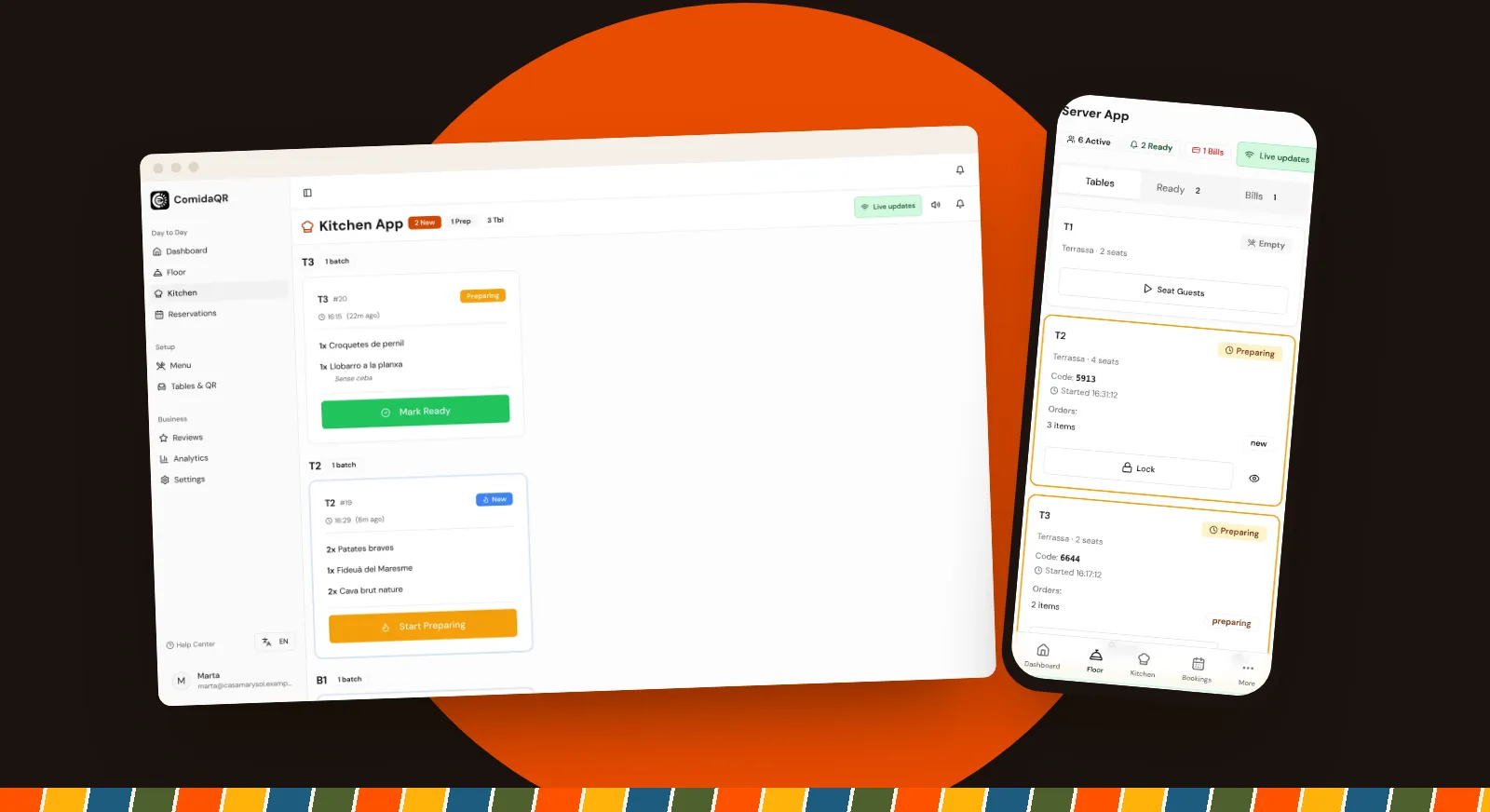
Digital kitchen displays replace the paper rail with a screen (or screens) showing current orders in real time. When a customer submits an order from their phone, it appears on the kitchen display within seconds via WebSocket connection: no server walk, no handwritten ticket, no delay.
Orders are grouped by table, with each round showing the items, quantities, chosen variants, the guest's notes for each dish and how long ago it was sent. The key information (which table, what to cook and how long it has been waiting) is visible at a glance, even when staff are moving quickly.
Status Progression: New, Preparing, Ready
Every order batch follows a simple three-step status: New (just received), Preparing (kitchen is working on it), Ready (completed and awaiting pickup). Kitchen staff update status with a single tap: no typing, no selecting from dropdown menus, no complexity.
When a batch moves to 'Ready', it appears straight away in the Ready tab of the floor staff's app, and the guests see the new status on their phones. The server knows exactly which table has food ready for delivery without walking to the kitchen to check. This eliminates one of the most common sources of delay in restaurant service: food sitting on the pass because nobody told the server it was ready.
Audio Alerts and Notifications
In a busy kitchen, a screen nobody is looking at is easy to miss. The ComidaQR kitchen screen plays a beep and shows a pop-up when a new order arrives, so incoming batches get noticed even when staff are focused on prep work.
Both the sound and the pop-up can be switched off: some kitchens want an alert for every new order, others find the screen alone is enough. Place the screen where the cooks can see it from their stations, and test the volume during a real service before relying on it.
The Coordination Effect
The biggest impact of digital kitchen displays isn't any single feature: it's the coordination effect. When kitchen, servers, and customers are all connected through the same real-time system, information flows without friction. The kitchen knows what's coming before it arrives. The server knows what's ready without asking. The customer knows their order was received.
This coordination reduces errors (no more misread handwriting or lost tickets), speeds up service (information travels at the speed of WebSocket, not the speed of walking), and improves morale (less shouting, less confusion, less blame). If the connection drops, the screen reconnects on its own and checks for new orders every 10 seconds in the meantime, so nothing gets stuck.